fastStructure
fastStructure is an algorithm for inferring population structure from large SNP genotype data. It is based on a variational Bayesian framework for posterior inference and is written in Python2.x. It can use input files in plink format (bed, bim and fam files for the dataset should all be present in the same path).

Pruning
Before running fastStructure, it is advised to prune the dataset. We will use plink to prune the dataset by excluding the SNPs which are in Linkage. The resulting file will have fewer SNPs, and the computation will be faster. For these exercises, we will subset the data to contain only SNPs from chromosome 8 (--chr 8) so we can finish the demonstration quickly. In reality, you would most probably like to run fastStructure on all autosomes (--autosome) rather than just on one chromosome.
To prune for LD we will use these settings previously recommended for HO array
--indep-pairwise 200 25 0.4:
window size in SNPs = 200;
number of SNPs to shift the window at each step = 25;
r^2 threshold (pairwise SNP-SNP metric) = 0.4;
Using these parameters specified above we will
a) consider a window of 200 SNPs,
b) calculate LD between each pair of SNPs in the window,
b) remove one of a pair of SNPs if the LD is greater than 0.4,
c) shift the window 25 SNPs forward and repeat the procedure.
plink1.9 --bfile hgdp_newFIDs_modernPops_MindGeno --indep-pairwise 200 25 0.4 --out prune_hgdp
plink1.9 --bfile hgdp_newFIDs_modernPops_MindGeno --extract prune_hgdp.prune.in --recode12 --make-bed --chr 8 --out hgdp_pruned_chr8
Question
How many SNPs are left after pruning?
Running fastStructure
The main script you will need to execute is structure.py. If you would like to run it on your own computer you could install it following the instructions. I already installed in on evop-login server and in next few steps you will prepare folders and make a soft link to directory with python scripts used by fastStructure.
cd ~/popgen_intro
mkdir fastStructure
cd fastSructure
mkdir out
ln -s /home/bajiv90/bin_bajiv90/fastStructure-master fs
To see command-line options that need to be passed to the script, you can do the following:
$ python fs/structure.py

Here is how you can use this script

Usage: python structure.py
     -K <int>   (number of populations)
     --input=<file>   (/path/to/input/file)
     --output=<file>   (/path/to/output/file)
     --tol=<float>   (convergence criterion; default: 10e-6)
     --prior={simple,logistic}   (choice of prior; default: simple)
     --cv=<int>   (number of test sets for cross-validation, 0 implies no CV step; default: 0)
     --format={bed,str} (format of input file; default: bed)
     --full   (to output all variational parameters; optional)
     --seed=<int>   (manually specify seed for random number generator; optional)
The key options to pass to the scripts are the input file, the output file and the number of populations.
Assuming the input file is named hgdp_pruned_chr8.bed (with corresponding hgdp_pruned_chr8.fam and hgdp_pruned_chr8.bim), the output file is named hgdp_pruned_chr8_output and the number of populations you would like is 2, you can run the algorithm as follows:
python fs/structure.py -K 2 --input=../plink_exercise/hgdp_pruned_chr8 --output=out/hgdp_pruned_chr8
Note
The input file names should not include suffixes (e.g., .bed) and are relative to the main project directory (unless a full path is provided).
This generates a hgdp_pruned_chr8.2.log file that tracks how the algorithm proceeds, and files hgdp_pruned_chr8.2.meanQ and hgdp_pruned_chr8.2.meanP containing the posterior mean of admixture proportions and allele frequencies, respectively. The orders of samples and SNPs in the output files match those in the .fam file and .bim file, respectively.
Task
Create a for loop that will execute fastStructure for K values from 2 to 9.
Choosing model complexity
In order to identify the best value of K ( i.e. to choose the appropriate number of model components) that explain structure in the dataset, it is recommend to run the algorithm for multiple choices of K. Creators of fastStructure have provided a utility tool to parse through the output of these runs and provide a reasonable range of values for the model complexity appropriate for a dataset of interest.
Assuming that the algorithm was run on the test dataset for choices of K ranging from 2 to 4, and the output flag was --output=out/hgdp_pruned_chr8, you can obtain the model complexity by doing the following:
$ python fs/chooseK.py --input=out/hgdp_pruned_chr8
Model complexity that maximizes marginal likelihood = 4
Model components used to explain structure in data = 2
Visualizing admixture proportions
Note
If you would like to visualize results stored at evop-login you have to ssh with -X option.
In order to visualize the expected admixture proportions inferred by fastStructure, creators of fastStructure have provided a simple tool to generate Distruct plots using the mean of the variational posterior distribution over admixture proportions. The samples in the plot will be grouped according to population labels inferred by fastStructure. However, if the user would like to group the samples according to some other categorical label (e.g., geographic location), these labels can be provided as a separate file using the flag --popfile. The order of labels in this file (one label per row) should match the order of samples in the input data files.
$ python fs/distruct.py

Here is how you can use this script

Usage: python distruct.py
     -K <int>  (number of populations)
     --input=<file>  (/path/to/input/file; same as output flag passed to structure.py)
     --output=<file>   (/path/to/output/file)
     --popfile=<file>  (file with known categorical labels; optional)
     --title=<figure title>  (a title for the figure; optional)
Assuming the algorithm was run on the hgdp_pruned_chr8 dataset for K=2, and the output flag was --output=out/hgdp_pruned_chr8, you can generate a Distruct plot by doing the following:
Assuming that we logged in to evop-login with ssh -X we can open the .svg file like this:
Alternatively, you can download the file to your local computer and inspect it there.
We would still like to change the default population labels. To do so we can provide distruct with --popfile in which we specify population labels for each individual. You can find this information in .fam file in which I added in first column infomation about population for each individual.
Task
a) Extract first column from .fam file and save it in separate file.
b) Make a new plot using labels from newly created file.
Hints
a) Try doing it with awk or cut
b) Use --popfile option in distruct.py
Click for answers
a) Extract first column from .fam file and save it in separate file.
cd ~/popgen_intro/fastStructure

# To extract first column with cut and save it in new file
cut -f1 -d" " ../plink_exercise/hgdp_4_fastStructure.fam > pop_labels.txt

# To extract first column with awk and save it in new file
awk '{print $1}' ../plink_exercise/hgdp_4_fastStructure.fam > pop_labels.txt
b) Make a new plot using labels from newly created file.
Click to see plots

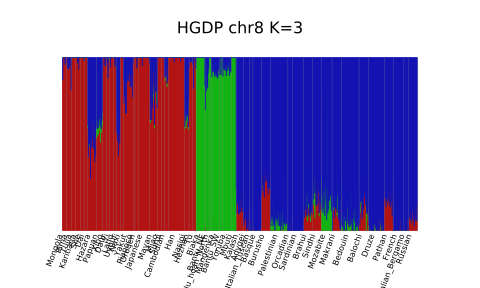
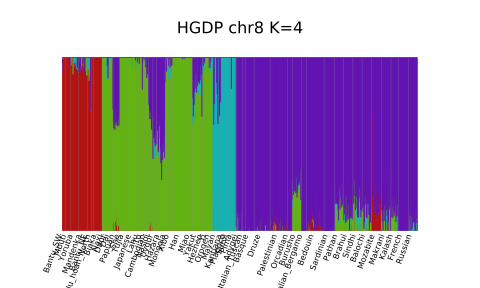
Tip
Plotting fastStructure results with distruct can be tricky when many K's and runs are present. One can use PONG to visualize multiple runs and Ks from fastStructure or ADMIXTURE. PONG takes care of the colors across different Ks and order of individuals and populations for us. It's great and I highly recommend it. :)